record video file using video grabber delphi
Showing posts with label Webcamera- Video Grabber- Delphi. Show all posts
Showing posts with label Webcamera- Video Grabber- Delphi. Show all posts
Monday, 5 January 2015
Tuesday, 27 September 2011

Webcamera- Video Grabber- Delphi
| September 27, 2011
Overlay Text in Video/Preview Webcam in Delphi 7 Using Video Grabber Component (Basic Concept)
Overlay Text in Video/Preview Webcam in Delphi 7 Using Video Grabber Component
In the news broadcast, absolutely there is running text in the bottom of the monitor that keep moving (running news) to visualize the variety of latest news. Tone of the way that is used to visualize the running news is with overlay text in news video that is reported.
Video grabber component in Delphi can be used to conducted overlay text in video that will be visualized. Overlay can be done in the static text mode and dynamic text mode according to the program that is conducted.
Note:
The video grabber component that is used in this application is shareware version so that it could not work properly (maximal), in limited random time, applicaton will stopped working, besides that application will appear overlay text nagscreen the address of the website is www.datastead.com
I hope this writing can give benefit to the visitors, readers, developer and me. Thanks for visiting and availability for sharing this article by pressing
or just press like button under this posting
I hope this writing can give benefit to the visitors, readers, developer and me. Thanks for visiting and availability for sharing this article by pressing
 | Share this on Facebook |


Webcamera- Video Grabber- Delphi
| September 27, 2011
Accessing Video URL with Delphi Using Video Grabber Component
Accessing Video URL with Delphi Using Video Grabber Component
Accessing video URL is video access that is saved in a certain directory website, where the video is addressed in a certain web domain. Domain can be in the form form of address that is friendly user like axrtsphttp://webkamera.kristinehamn.se/mpeg4/media.amp, or IP, for example http://192.168.50.1/cencored
Programming with Borland Delphi support for accessing video url including IP camera,
The component that is used in making video url accessing application with Delphi is as follows:
Arrange the source code like the picture Bellow:

And then type the following source code
then run the application, this is the resut test:

Note:
The video grabber component that is used in this application is shareware version so that it could not work properly (maximal), in limited random time, applicaton will stopped working, besides that application will appear overlay text nagscreen the address of the website is www.datastead.com
I hope this writing can give benefit to the visitors, readers, developer and me. Thanks for visiting and availability for sharing this article by pressing
or just press like button under this posting
Accessing video URL is video access that is saved in a certain directory website, where the video is addressed in a certain web domain. Domain can be in the form form of address that is friendly user like axrtsphttp://webkamera.kristinehamn.se/mpeg4/media.amp, or IP, for example http://192.168.50.1/cencored
Programming with Borland Delphi support for accessing video url including IP camera,
The component that is used in making video url accessing application with Delphi is as follows:
No | Component Name | Properties | Value |
| 1 | Label1 | Caption | Video URL Address |
| 2 | Button1 | Caption | Preview |
| 3 | Edit1 | Text | axrtsphttp://webkamera .kristinehamn.se/mpeg4/media.amp |
| 4 | Videograbber1 | - |
Arrange the source code like the picture Bellow:

And then type the following source code
| No | Component | Event | Source Code |
| 1 | Button1 | OnClick | VideoGrabber.IPCameraURL := edtIPCameraURL.Text; if VideoGrabber.VideoSource <> vs_IPCamera then begin if VideoGrabber.CurrentState = cs_Down then begin VideoGrabber.VideoSource := vs_IPCamera; end end; VideoGrabber.StartPreview; |
| 2 | Form1 | OnCreate | VideoGrabber.VideoSource := vs_IPCamera; |
then run the application, this is the resut test:

Note:
The video grabber component that is used in this application is shareware version so that it could not work properly (maximal), in limited random time, applicaton will stopped working, besides that application will appear overlay text nagscreen the address of the website is www.datastead.com
I hope this writing can give benefit to the visitors, readers, developer and me. Thanks for visiting and availability for sharing this article by pressing
| | Share this on Facebook |
Webcamera- Video Grabber- Delphi
| September 27, 2011
Short Review about accessing web camera by video grabber Component on Delphi 7
Short Review about accessing web camera by video grabber Component on Delphi 7
Overlaying Picture in Delphi 7
Have you ever been watch television? Maybe that’s weird and silly question. The answer is absolutely yes. Next, have you ever concern that every television channel that you choose always appearing their logo, for example BBC, Al Jazeera, etc. Every channel has logo as their brand.
Overlaying Text in Video/Preview Webcam in Delphi 7
In the news broadcast, absolutely there is running text in the bottom of the monitor that keep moving (running news) to visualize the variety of latest news. Tone of the way that is used to visualize the running news is with overlay text in news video that is reported.
Video grabber component in Delphi can be used to conducted overlay text in video that will be visualized. Overlay can be done in the static text mode and dynamic text mode according to the program that is conducted.
Access Multi Web Camera Delphi
This application is application that can visualize video preview or picture which the source is from web camera, where the amount of camera input is 3 web cameras. The next step is video preview or recording toward video from multi camera that is used. Video will be saved in one folder. To make Access multi web camera Delphi through video grabber component, please follow the steps below, fast and easy, but powerful. However, this article just discuss about making application that is limited on preview web camera, for processing video capture will be discussed in another writing.
Video Rotation with Delphi
If you ever record video using digital camera, handy cam, or camera with low resolution in mobile phone J, but the recording result is at an angle 90, of course it will uncomfortable to watch it. It is uncomfortable because you have to tilt your head to balance the video declivity. My question maybe sound silly, but the fact is like that right? Of course you will more enjoy watching video that fit with the monitor, right? If so, maybe the video rotation application using Delphi making use of video grabber component will very helpful to solve the problem.
The application that will be made can rotate video visualization suitable with your expectation, for example rotate in 90°,180° ,270° or suitable with the corner in your expectation that you can type the value so that the declivity is suitable with your expectation.,
Capturing Picture /Photo Delphi Using Video Grabber Component
Video grabber component in Delphi can be used to capture picture/ photo the picture can be saved in to folder or database. This component has a lot of function and the function refer to camera access like video recorder, photo, video player etc.
Motion Detection with Delphi
Motion detection is application that is used as observer system or protection system in a certain room, for example coffer room of a organization, such as bank, in a certain time this room has to be empty without anyone inside, as protection application can be developed using sms delivery facility to those that is related when detected a movement. This application can also be developed by automatic facility video recorder if detecting a movement in video preview that is capture in camera as protection input system.
Video Recorder Or Video Capture With Borland Delphi
Video grabber component have function as video recorder, with the source of the video is web camera. Besides, this component have function as Audio recording, motion detection, text over lay, picture over lay, video rotation, and etc.
This article will discuss how to make video recorder application with Delphi through video grabber component.
Video Player Delphi Using Video Grabber Component
This writing will discuss the steps of making video player application using video grabber component.
Accessing Video URL with Delphi
Accessing video URL is video access that is saved in a certain directory website, where the video is addressed in a certain web domain. Domain can be in the form form of address that is friendly user like axrtsphttp://webkamera.kristinehamn.se/mpeg4/media.amp, or IP, for example http://192.168.50.1/cencored
Accessing IP Camera with Delphi Using Video Grabber Component
IP camera actually has similarly with video url, the difference is on the sort, where IP cam is just a preview from camera that is used. For the next can be processed video recording, picture/photo capturing or just preview. Whereas video url is a file that is saved in certain directory website then can be accessed (similar with hosting free video)
I hope this writing can give benefit to the visitors, readers, developer and me. Thanks for visiting and availability for sharing this article by pressing
or just press like button under this posting
Overlaying Picture in Delphi 7
Have you ever been watch television? Maybe that’s weird and silly question. The answer is absolutely yes. Next, have you ever concern that every television channel that you choose always appearing their logo, for example BBC, Al Jazeera, etc. Every channel has logo as their brand.
Overlaying Text in Video/Preview Webcam in Delphi 7
In the news broadcast, absolutely there is running text in the bottom of the monitor that keep moving (running news) to visualize the variety of latest news. Tone of the way that is used to visualize the running news is with overlay text in news video that is reported.
Video grabber component in Delphi can be used to conducted overlay text in video that will be visualized. Overlay can be done in the static text mode and dynamic text mode according to the program that is conducted.
Access Multi Web Camera Delphi
This application is application that can visualize video preview or picture which the source is from web camera, where the amount of camera input is 3 web cameras. The next step is video preview or recording toward video from multi camera that is used. Video will be saved in one folder. To make Access multi web camera Delphi through video grabber component, please follow the steps below, fast and easy, but powerful. However, this article just discuss about making application that is limited on preview web camera, for processing video capture will be discussed in another writing.
Video Rotation with Delphi
If you ever record video using digital camera, handy cam, or camera with low resolution in mobile phone J, but the recording result is at an angle 90, of course it will uncomfortable to watch it. It is uncomfortable because you have to tilt your head to balance the video declivity. My question maybe sound silly, but the fact is like that right? Of course you will more enjoy watching video that fit with the monitor, right? If so, maybe the video rotation application using Delphi making use of video grabber component will very helpful to solve the problem.
The application that will be made can rotate video visualization suitable with your expectation, for example rotate in 90°,180° ,270° or suitable with the corner in your expectation that you can type the value so that the declivity is suitable with your expectation.,
Capturing Picture /Photo Delphi Using Video Grabber Component
Video grabber component in Delphi can be used to capture picture/ photo the picture can be saved in to folder or database. This component has a lot of function and the function refer to camera access like video recorder, photo, video player etc.
Motion Detection with Delphi
Motion detection is application that is used as observer system or protection system in a certain room, for example coffer room of a organization, such as bank, in a certain time this room has to be empty without anyone inside, as protection application can be developed using sms delivery facility to those that is related when detected a movement. This application can also be developed by automatic facility video recorder if detecting a movement in video preview that is capture in camera as protection input system.
Video Recorder Or Video Capture With Borland Delphi
Video grabber component have function as video recorder, with the source of the video is web camera. Besides, this component have function as Audio recording, motion detection, text over lay, picture over lay, video rotation, and etc.
This article will discuss how to make video recorder application with Delphi through video grabber component.
Video Player Delphi Using Video Grabber Component
This writing will discuss the steps of making video player application using video grabber component.
Accessing Video URL with Delphi
Accessing video URL is video access that is saved in a certain directory website, where the video is addressed in a certain web domain. Domain can be in the form form of address that is friendly user like axrtsphttp://webkamera.kristinehamn.se/mpeg4/media.amp, or IP, for example http://192.168.50.1/cencored
Accessing IP Camera with Delphi Using Video Grabber Component
IP camera actually has similarly with video url, the difference is on the sort, where IP cam is just a preview from camera that is used. For the next can be processed video recording, picture/photo capturing or just preview. Whereas video url is a file that is saved in certain directory website then can be accessed (similar with hosting free video)
I hope this writing can give benefit to the visitors, readers, developer and me. Thanks for visiting and availability for sharing this article by pressing
| | Share this on Facebook |
Webcamera- Video Grabber- Delphi
| September 27, 2011
Making Video Rotation with Delphi Using Video Grabber Component
Making Video Rotation with Delphi Using Video Grabber Component
If you ever record video using digital camera, handy cam, or camera with low resolution in mobile phone J, but the recording result is at an angle 90, of course it will uncomfortable to watch it. It is uncomfortable because you have to tilt your head to balance the video declivity. My question maybe sound silly, but the fact is like that right? Of course you will more enjoy watching video that fit with the monitor, right? If so, maybe the video rotation application using Delphi making use of video grabber component will very helpful to solve the problem.
The application that will be made can rotate video visualization suitable with your expectation, for example rotate in 90°,180° ,270° or suitable with the corner in your expectation that you can type the value so that the declivity is suitable with your expectation.,
Note:
The video grabber component that is used in this application is shareware version so that it could not work properly (maximal), in limited random time, application will stopped working, besides that application will appear overlay text nagscreen the address of the website is www.datastead.com
I hope this writing can give benefit to the visitors, readers, developer and me. Thanks for visiting and availability for sharing this article by pressing
| | Share this on Facebook |

Webcamera- Video Grabber- Delphi
| September 27, 2011
Video Recorder Or Video Capture With Borland Delphi Through Video Grabber (Share Ware Version)
Video Recorder Or Video Capture With Borland Delphi Through Video Grabber (Share Ware Version)
Video grabber component have function as video recorder, with the source of the video is web camera. Besides, this component have function as Audio recording, motion detection, text over lay, picture over lay, video rotation, and etc.
This article will tell you how to make video recorder application with Delphi through video grabber component.
Please Insert this Following Component to the design form
Then Arrange the application design like the picture bellow :

Type this following source code:
This is the picture of Video Recorder Or Video Capture With Borland Delphi Application test
 Note:
Note:
The video grabber component that is used in this application is shareware version so that it could not work properly (maximal), in limited random time, application will stopped working, besides that application will appear overlay text nagscreen the address of the website is www.datastead.com
I hope this writing can give benefit to the visitors, readers, developer and me. Thanks for visiting and availability for sharing this article by pressing
or just press like button under this posting
Video grabber component have function as video recorder, with the source of the video is web camera. Besides, this component have function as Audio recording, motion detection, text over lay, picture over lay, video rotation, and etc.
This article will tell you how to make video recorder application with Delphi through video grabber component.
Please Insert this Following Component to the design form
| No | Component Name | Properties | Value |
| 1 | Button1 | Caption | Record |
| 2 | Button2 | Caption | Stop Record |
| 3 | Button3 | Caption | Preview |
| 4 | Button4 | Caption | Stop Preview |
| 5 | VideoGrabber1 | Name | VideoGrabberSrc1 |
| 6 | ComboBox1 | Text | Camera Device |
| 7 | Label1 | Choose Camera | |
| 8 | CheckBox1 | - | - |
| 9 | Edit1 | Text | FileName |
Then Arrange the application design like the picture bellow :

Video Recorder Or Video Capture With Borland Delphi design Form
Type this following source code:
No | Component | Event | Source Code |
| 1 | Form1 | OnCreate | cboVideoDevices1.items.add( VideoGrabberSrc1.VideoDevice); VideoGrabberSrc1.Display_AutoSize := False; |
| 2 | cboVideoDevices1 | OnChange | VideoGrabberSrc1.VideoDevice :=CboVideoDevices1.ItemIndex ; |
| 3 | Button1 | OnClick | if CheckBox1.Checked then begin VideoGrabberSrc1.RecordingFileName := Edit1.Text; end else begin VideoGrabberSrc1.RecordingFileName := ''; |
| 4 | Button2 | OnClick | VideoGrabberSrc1.StopRecording; |
| 5 | Button3 | OnClick | VideoGrabberSrc1.StartPreview; |
| 6 | Button4 | OnClick | VideoGrabberSrc1.StopPreview; |
This is the picture of Video Recorder Or Video Capture With Borland Delphi Application test

The video grabber component that is used in this application is shareware version so that it could not work properly (maximal), in limited random time, application will stopped working, besides that application will appear overlay text nagscreen the address of the website is www.datastead.com
I hope this writing can give benefit to the visitors, readers, developer and me. Thanks for visiting and availability for sharing this article by pressing
| | Share this on Facebook |

Webcamera- Video Grabber- Delphi
| September 27, 2011
Capture Picture /Photo Delphi Using Video Grabber Component
Capture Picture /Photo Delphi Using Video Grabber Component
Video grabber component in Delphi can be used to capture picture/ photo the picture can be saved in to folder or database. This component has a lot of function and the function refer to camera access like video recorder, photo, video player etc. To make the Capturing picture /photo Delphi using video grabber component please follow a brief tutorial below:
Insert the component on the table bellow to the design form :
Arrange the component like the picture bellow:

Then type this following source code
Then run the CapturePicture /Photo Delphi Using Video Grabber by pressing run button
This is the picture of CapturePicture /Photo Delphi Using Video Grabber Application

Note:
The video grabber component that is used in this application is shareware version so that it could not work properly (maximal), in limited random time, application will stopped working, besides that application will appear overlay text nag screen the address of the website is www.datastead.com
I hope this writing can give benefit to the visitors, readers, developer and me. Thanks for visiting and availability for sharing this article by pressing
or just press like button under this posting
Video grabber component in Delphi can be used to capture picture/ photo the picture can be saved in to folder or database. This component has a lot of function and the function refer to camera access like video recorder, photo, video player etc. To make the Capturing picture /photo Delphi using video grabber component please follow a brief tutorial below:
Insert the component on the table bellow to the design form :
| No | Component Name | Properties | Value |
| 1 | Button1 | Caption | Preview |
| 2 | Button2 | Caption | Capture Photo |
| 3 | Label1 | Caption | Select Camera |
| 4 | Combobox1 | - | - |
| 5 | Image1 | - | - |
| 6 | VideoGrabber1 | - | - |
Arrange the component like the picture bellow:

Capture Picture /Photo Delphi Using Video Grabber Component design Form
Then type this following source code
No | Component | Event | Source Code |
| Form1 | OnCreate | videograbber1.Display_AutoSize:=false; combobox1.Items.add(videograbber1.VideoDevices); | |
| Button1 | OnClick | videograbber1.StartPreview; | |
| Button2 | OnClick | var Picture: TBitmap; begin Picture:=videograbber1.GetLastFrameAsTBitmap(0, false, 0, 0, 0, 0, image1.Width, image1.Height, 0); image1.Picture.Assign (Picture); end; |
Then run the CapturePicture /Photo Delphi Using Video Grabber by pressing run button
This is the picture of CapturePicture /Photo Delphi Using Video Grabber Application

Note:
The video grabber component that is used in this application is shareware version so that it could not work properly (maximal), in limited random time, application will stopped working, besides that application will appear overlay text nag screen the address of the website is www.datastead.com
I hope this writing can give benefit to the visitors, readers, developer and me. Thanks for visiting and availability for sharing this article by pressing
| | Share this on Facebook |

Webcamera- Video Grabber- Delphi
| September 27, 2011
Step by step Overlaying Picture in Delphi 7 Using Video Grabber Component
Step by step Overlaying Picture in Delphi 7 Using Video Grabber Component
This writing will discuss picture overlay technique by Delphi 7 using video grabber component.
The following component as follows,
arranges it until become like the picture below.

The source code for this Overlaying Picture in Delphi 7 Using Video Grabber Component describe bellow:
The following is the execution result of picture overlay application that had been made.


Note:
The video grabber component that is used in this application is shareware version so that it could not work properly (maximal), in limited random time, applicaton will stopped working, besides that application will appear overlay text nagscreen the address of the website is www.datastead.com
I hope this writing can give benefit to the visitors, readers, developer and me. Thanks for visiting and availability for sharing this article by pressing
or just press like button under this posting
This writing will discuss picture overlay technique by Delphi 7 using video grabber component.
The following component as follows,
No | Component Name | Properties | Value |
| 1 | Button1 | Caption | Start Picture Overlay 1 |
| 2 | Button2 | Caption | Preview Video |
| 3 | Button3 | Caption | Start Picture Overlay 2 |
| 4 | Label1 | Caption | Select Camera |
| 5 | ComboBox1 | Text | - |
| 6 | Image1 | Picture | Load from Folder and Chose the picture (File Type Jpg / Bmp) |
| 7 | Image2 | Picture | Load from Folder and Chose the picture (File Type Jpg / Bmp) |
| 8 | VideoGrabber1 | - | - |
arranges it until become like the picture below.
The source code for this Overlaying Picture in Delphi 7 Using Video Grabber Component describe bellow:
| No | Component | Event | Source Code |
| 1 | Form1 | OnCreate | combobox1.Items.Add(videograbber1.VideoDevices); |
| 2 | Button1 | OnClick | videograbber1.ImageOverlayEnabled:=true; videograbber1.ImageOverlay_LeftLocation:=0; videograbber1.ImageOverlay_TopLocation:=0 ; videograbber1.ImageOverlay_Height:=50; videograbber1.ImageOverlay_Width:=50; videograbber1.SetImageOverlayFromTImage(image1); |
| 3 | Button2 | Caption | videograbber1.StartPreview; |
| 4 | Button3 | Caption | videograbber1.ImageOverlayEnabled:=true; videograbber1.ImageOverlay_LeftLocation:=270; videograbber1.ImageOverlay_TopLocation:=0 ; videograbber1.ImageOverlay_Height:=50; videograbber1.ImageOverlay_Width:=50; videograbber1.SetImageOverlayFromTImage(image2); |
The video grabber component that is used in this application is shareware version so that it could not work properly (maximal), in limited random time, applicaton will stopped working, besides that application will appear overlay text nagscreen the address of the website is www.datastead.com
I hope this writing can give benefit to the visitors, readers, developer and me. Thanks for visiting and availability for sharing this article by pressing
| | Share this on Facebook |
Webcamera- Video Grabber- Delphi
| September 27, 2011
Overlaying Picture in Delphi 7 Using Video Grabber Component
Overlaying Picture in Delphi 7 Using Video Grabber Component
Have you ever been watch television? Maybe that’s weird and silly question. The answer is absolutely yes. Next, have you ever concern that every television channel that you choose always appearing their logo, for example BBC, Al Jazeera, etc. Every channel has logo as their brand.
Note:
The video grabber component that is used in this application is shareware version so that it could not work properly (maximal), in limited random time, applicaton will stopped working, besides that application will appear overlay text nagscreen the address of the website is www.datastead.com
I hope this writing can give benefit to the visitors, readers, developer and me. Thanks for visiting and availability for sharing this article by pressing
or just press like button under this posting
I hope this writing can give benefit to the visitors, readers, developer and me. Thanks for visiting and availability for sharing this article by pressing
| | Share this on Facebook |

Webcamera- Video Grabber- Delphi
| September 27, 2011
Step By Step Over Lay Text In Video / Preview Webcam on Delphi 7 Using Video Grabber Component
Step By Step Over Lay Text In Video / Preview Webcam on Delphi 7 Using Video Grabber Component
Enter the component below into the Delphi form design

Type the source code program as follows:
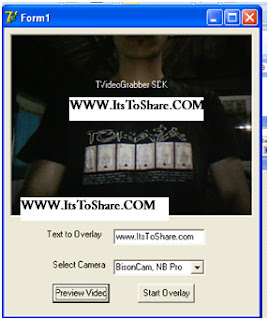
next execute the application that had been made, the result is as follows:

overlay text Delphi application test is as follows;


Note:
The video grabber component that is used in this application is shareware version so that it could not work properly (maximal), in limited random time, application will stopped working, besides that application will appear overlay text nagscreen the address of the website is www.datastead.com
I hope this writing can give benefit to the visitors, readers, developer and me. Thanks for visiting and availability for sharing this article by pressing
or just press like button under this posting
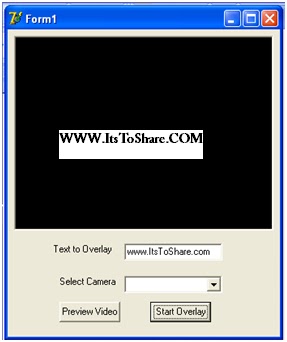
Enter the component below into the Delphi form design
| No | Component Name | Properties | Value |
| 1 | Button1 | Caption | Start Overlay |
| 2 | Button2 | Caption | Preview Video |
| 3 | Label1 | Caption | Text to Overlay |
| 4 | Label2 | Caption | Select Camera |
| 5 | Edit1 | Text | www.ItsToShare.com |
| 6 | Combobox1 | - | - |
| 7 | VideoGrabber1 | - | - |
arrange the design visualization of the Overlay text Delphi component become as follows.

Type the source code program as follows:
| No | Component | Event | Source Code |
| 1 | Form1 | On Create | combobox1.Items.Add(videograbber1.VideoDevices); |
| 2 | Button1 | On Click | videograbber1.TextOverlay_Enabled:=true; videograbber1.TextOverlay_Left:=0; videograbber1.TextOverlay_String:=edit1.Text; |
| 3 | Button2 | On Click | videograbber1.StartPreview; |
| 4 | Edit1 | On Change | videograbber1.TextOverlay_String:=edit1.Text; |
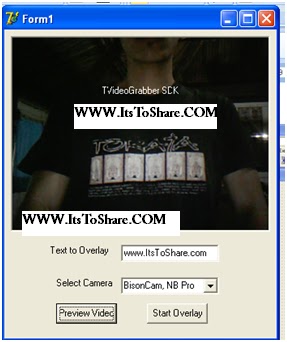
next execute the application that had been made, the result is as follows:
overlay text Delphi application test is as follows;


Note:
The video grabber component that is used in this application is shareware version so that it could not work properly (maximal), in limited random time, application will stopped working, besides that application will appear overlay text nagscreen the address of the website is www.datastead.com
I hope this writing can give benefit to the visitors, readers, developer and me. Thanks for visiting and availability for sharing this article by pressing
| | Share this on Facebook |
Saturday, 24 September 2011
Webcamera- Video Grabber- Delphi
| September 24, 2011
Download Videograbber Delphi
Video Grabber can be use for this following project :
Overlaying Picture in Delphi 7
Overlaying Text in Video/Preview Webcam
Access Multi Web Camera
Video Rotation
Capturing Picture /Photo
Motion Detection
Video Recorder Or Video Capture
Video Player Delphi
Accessing Video URL
Accessing IP Camera
DOWNLOAD VIDEOGRABBER CLICK HERE
The video grabber component is shareware version so that it could not work properly (maximal), in limited random time, application will stopped working, besides that application will appear overlay text nagscreen the address of the website is www.datastead.com
I hope this article can give benefit to the visitors, readers, developer and me. Thanks for visiting and availability for sharing this article by pressing
or just press like button under this posting
Overlaying Picture in Delphi 7
Overlaying Text in Video/Preview Webcam
Access Multi Web Camera
Video Rotation
Capturing Picture /Photo
Motion Detection
Video Recorder Or Video Capture
Video Player Delphi
Accessing Video URL
Accessing IP Camera
DOWNLOAD VIDEOGRABBER CLICK HERE
The video grabber component is shareware version so that it could not work properly (maximal), in limited random time, application will stopped working, besides that application will appear overlay text nagscreen the address of the website is www.datastead.com
I hope this article can give benefit to the visitors, readers, developer and me. Thanks for visiting and availability for sharing this article by pressing
| | Share this on Facebook |

Webcamera- Video Grabber- Delphi
| September 24, 2011
Motion Detection with Delphi through Video Grabber (Share Ware Version)
Motion Detection with Delphi through Video Grabber (Share Ware Version)
Motion detection is application that is used as observer system or protection system in a certain room, for example coffer room of a organization, such as bank, in a certain time this room has to be empty without anyone inside, as protection application can be developed using sms delivery facility to those that is related when detected a movement. This application can also be developed by automatic facility video recorder if detecting a movement in video preview that is capture in camera as protection input system.
The following is the steps in making Motion detection application with Delphi through Video grabber
Insert the component on the table bellow to the design form :
Arrange the component like the picture bellow:

Then type this following source code
This is the picture of Motion Detection with Delphi through Video Grabber (Share Ware Version) application:
Start previewing the camera

Motion detection Delphi 1

Motion detection Delphi 2

Note:
The video grabber component that is used in this application is shareware version so that it could not work properly (maximal), in limited random time, application will stopped working, besides that application will appear overlay text nagscreen the address of the website is www.datastead.com
I hope this article can give benefit to the visitors, readers, developer and me. Thanks for visiting and availability for sharing this article by pressing
or just press like button under this posting
Motion detection is application that is used as observer system or protection system in a certain room, for example coffer room of a organization, such as bank, in a certain time this room has to be empty without anyone inside, as protection application can be developed using sms delivery facility to those that is related when detected a movement. This application can also be developed by automatic facility video recorder if detecting a movement in video preview that is capture in camera as protection input system.
The following is the steps in making Motion detection application with Delphi through Video grabber
Insert the component on the table bellow to the design form :
| No | Component Name | Properties | Value |
| 1 | Label1 | Caption | Start Preview |
| 2 | Button1 | Caption | Start Motion Detection |
| 3 | Button2 | Caption | Start Preview |
| 4 | Combobox1 | Text | - |
| 5 | Memo1 | Text | - |
| 6 | Memo1 | Text | - |
| 7 | Shape1 | Brush-Color | clBlack |
| 8 | Videograbber1 | - | - |
Arrange the component like the picture bellow:

Then type this following source code
No | Component | Event | Source Code |
| 1 | Form1 | OnCreate | VideoGrabber1. Display_AutoSize := false; // the control will not resize automatically VideoGrabber1. AutoRefreshPreview := true; // the preview will restart automatically when changing device properties (e.g. video size, analog video standard, etc...) combobox1.Text:= (videograbber1.VideoDevices); |
| 2 | Button1 | OnClick | videograbber1. MotionDetector_Enabled:=true; memo1.Text := VideoGrabber1. MotionDetector_Get2DTextGrid; |
| 3 | Button2 | OnClick | videograbber1.StartPreview; |
| 4 | Videograbber1 | OnMotionDetected | var MaxMotionXLocation, MaxMotionYLocation: LongInt; begin shape1.Brush.Color:=ClLime; VideoGrabber1. MotionDetector_CompareRed ; VideoGrabber1. MotionDetector_CompareBlue; VideoGrabber1. MotionDetector_CompareGreen; if VideoGrabber1. MotionDetector_GetCellLocation (MaxMotionCellX, MaxMotionCellY, MaxMotionXLocation, MaxMotionYLocation) then begin memo2.Text := VideoGrabber1. MotionDetector_Get2DTextMotion; end; |
| 5 | Videograbber1 | OnNot MotionDetected | Shape1.Brush.Color := clBlack; Memo2.Text := VideoGrabber1. MotionDetector_Get2DTextMotion; |
This is the picture of Motion Detection with Delphi through Video Grabber (Share Ware Version) application:
Start previewing the camera

Motion detection Delphi 1

Motion detection Delphi 2

Note:
The video grabber component that is used in this application is shareware version so that it could not work properly (maximal), in limited random time, application will stopped working, besides that application will appear overlay text nagscreen the address of the website is www.datastead.com
I hope this article can give benefit to the visitors, readers, developer and me. Thanks for visiting and availability for sharing this article by pressing
| | Share this on Facebook |