to get the source code click here
Showing posts with label Webcamera-DSpack Delphi. Show all posts
Showing posts with label Webcamera-DSpack Delphi. Show all posts
Friday, 20 January 2012

Webcamera-DSpack Delphi
| January 20, 2012
donload Delphi record video dspack
to download the source code please click here
Thursday, 22 September 2011
Webcamera-DSpack Delphi
| September 22, 2011
Download DSPack Delphi For Accessing WebCamera Delphi
DsPack is a multi media component, its can use for web cam accessing, video player, video recorder, audio recorder etc, This componen Also support for multi webcamera accessing... the most interesting is this component 100% free to use.
this component was created by by Henri Gourvest, his complete profile can be check on
http://www.progdigy.com
DOWNLOAD DSPack CLICK HERE
I hope this article can give benefit to the visitors, readers, developer and me. Thanks for visiting and availability for sharing this article by pressing
or just press like button under this posting
this component was created by by Henri Gourvest, his complete profile can be check on
http://www.progdigy.com
DOWNLOAD DSPack CLICK HERE
I hope this article can give benefit to the visitors, readers, developer and me. Thanks for visiting and availability for sharing this article by pressing
 | Share this on Facebook |

Sunday, 11 September 2011

Webcamera-DSpack Delphi
| September 11, 2011
How To Accessing Multi Webcamera (Multi Webcamera Accessing) In Delphi Using DsPack
The DsPack component can be used to access multi web camera (Multi Web camera accessing). In this example, the camera accessing program is conducted toward 3 different brand of camera, in order that there is no conflict or mistake occur in the program reading so that the result of webcam visualization which is appeared is not appropriate with the expectation because of mistaken in choosing the camera variety because same name factor.
P.S.: because of limited camera, we just use 1 camera but basically Multi Webcam Access program (Multi Webcam Accessing) in Borland Delphi 7 using DsPack has been tested and has good result.
Enter the component as follows:
No | Component Name | Property | Value |
| 1 | GroupBox1 | Caption | Camera |
| 2 | GroupBox2 | Caption | Camera |
| 3 | GroupBox3 | Caption | Camera |
| 4 | ComboBox1 | Text | - |
| 5 | ComboBox2 | Text | - |
| 6 | ComboBox3 | Text | - |
| 7 | Filtergraph1 | Mode | gmCapture |
| 8 | Filtergraph2 | Mode | gmCapture |
| 9 | Filtergraph3 | Mode | gmCapture |
| 10 | Filter 1 | Filtergraph | Filtergraph1 |
| 11 | Filter 2 | Filtergraph | Filtergraph2 |
| 12 | Filter 3 | Filtergraph | Filtergraph3 |
| 13 | VideoWindow1 | Filtergraph | Filtergraph1 |
| 14 | VideoWindow2 | Filtergraph | Filtergraph2 |
| 15 | VideoWindow3 | Filtergraph | Filtergraph3 |
The image of the design program is as follows:

Picture1: Visualization program design Multi Webcam Accessing (Multi Webcam Accessing) in Borland Delphi 7 using DsPack

Next, please type the source code:
| No | Component Name | Event | Source Code |
| 1 | Form1 | OnCreate | var i : integer; begin CapEnum:= TSysDevEnum.Create(CLSID_VideoInputDeviceCategory); for i := 0 to CapEnum.CountFilters - 1 do begin combobox1.Items.Add(CapEnum.Filters[i].FriendlyName); combobox2.Items.Add(CapEnum.Filters[i].FriendlyName); combobox3.Items.Add(CapEnum.Filters[i].FriendlyName); end; |
| 2 | Form1 | OnCloseQuery | capenum.Free; FilterGraph1.Stop; FilterGraph1.ClearGraph; FilterGraph1.Active := false; FilterGraph2.Stop; filtergraph2.ClearGraph; filtergraph2.Active:=false; FilterGraph3.Stop; filtergraph3.ClearGraph; filtergraph3.Active:=false; |
| 3 | ComboBox1 | OnChange | FilterGraph1.ClearGraph; FilterGraph1.Active := false; Filter1.BaseFilter.Moniker := CapEnum.GetMoniker(combobox1.ItemIndex); FilterGraph1.Active := true; with FilterGraph1 as ICaptureGraphBuilder2 do Renderstream(@PIN_CATEGORY_PREVIEW, nil, Filter1 as IBaseFilter,nil, VideoWindow1 as IbaseFilter); FilterGraph1.Play; |
| 4 | ComboBox2 | OnChange | FilterGraph2.ClearGraph; FilterGraph2.Active := false; Filter2.BaseFilter.Moniker := CapEnum.GetMoniker(combobox2.ItemIndex); FilterGraph2.Active := true; with FilterGraph2 as ICaptureGraphBuilder2 do Renderstream(@PIN_CATEGORY_PREVIEW, nil, Filter2 as IBaseFilter,nil, VideoWindow2 as IbaseFilter); FilterGraph2.Play; |
| 5 | ComboBox3 | OnChange | FilterGraph3.ClearGraph; FilterGraph3.Active := false; Filter3.BaseFilter.Moniker := CapEnum.GetMoniker(combobox3.ItemIndex); FilterGraph3.Active := true; with FilterGraph3 as ICaptureGraphBuilder2 do Renderstream(@PIN_CATEGORY_PREVIEW, nil, Filter3 as IBaseFilter,nil, VideoWindow3 as IbaseFilter); FilterGraph3.Play |
This Application is limited in webcam presenter,
next can be developed into picture capturer (photo/picture capturer), also video recorder (video capture)
Here is the result using 1 webcamera.

Here is the result using 3 webcamera.


The picture above, is created by Mr.Dayat Kurniawan ( http://hanundany.wordpress.com )
I hope this article can give benefit to the visitors, readers, developer and me. Thanks for visiting and availability for sharing this article by pressing
| | Share this on Facebook |
Wednesday, 24 August 2011

Webcamera-DSpack Delphi
| August 24, 2011
Recording Video Using Borland Delphi 7+Dspack
Beside to capture picture, the DSPack component also can be used to record or capture video. Besides, the DSPack component still have a lot of function, such as to detect a movement (motion detect), to recognize face (face recognition), to detect the edge of picture (edge detection) etc.
To make video recorder using DSPack, enter the component below:
| No. | Component Pallete | Component Name | Property | Value |
| 1 | Ds Pack | Filter1 | FilterGraph | FilterGraph1 |
| VideoWindow1 | FilterGraph | FilterGraph1 | ||
| FilterGraph1 | Mode | gmCapture | ||
| Standard | Button1 | Caption | Choose Folder | |
| Name | Buttonsavefolder1 | |||
| Standard | Button2 | Caption | Start Save Video | |
| Name | Buttonsave1 | |||
| Standard | Button3 | Caption | Close | |
| Name | ButtonClose | |||
| Win32 | StatusBar1 | Check the note under the table | ||
Double click the component and then will appear, 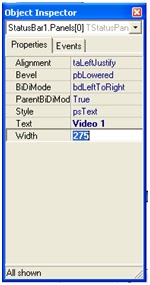  Then Click the object inspector and type Video1 on Text Property | ||||
Manage the image detail become as follows:

Picture1. Image Program Design.

Before type the source code, please declare this following global variable

After that enter the source code program as follows:
The Result Of The Program Execution is as follows:
| No | Component Name | Event | Source Code |
| Form1 | OnCreate | var i : integer; begin CapEnum:= TSysDevEnum.Create(CLSID_VideoInputDeviceCategory); for i := 0 to CapEnum.CountFilters - 1 do begin combobox1.Items.Add(CapEnum.Filters[i].FriendlyName); buttonsave1.Enabled:=false; buttonsavefolder1.Enabled:=false; end; | |
| ComboBox1 | OnChange | FilterGraph1.ClearGraph; FilterGraph1.Active := false; Filter1.BaseFilter.Moniker := CapEnum.GetMoniker(combobox1.ItemIndex); FilterGraph1.Active := true; with FilterGraph1 as ICaptureGraphBuilder2 do Renderstream(@PIN_CATEGORY_PREVIEW, nil, Filter1 as IBaseFilter,nil, VideoWindow1 as IbaseFilter); FilterGraph1.Play; buttonsavefolder1.Enabled:=true; | |
| Buttonsavefolder1 | OnClick | if savedialog1.Execute = true then buttonsave1.Enabled:=true; | |
| Buttonsave1 | OnClick | var multiplexer: IBaseFilter; Writer: IFileSinkFilter; i:integer; begin VideoMediaTypes.MediaDescription[i]; savefile1:=savedialog1.FileName ; if FilterGraph1.Active then FilterGraph1.Active:=false; FilterGraph1.ClearGraph; //active filter graph FilterGraph1.Active:=true; // now render streams with FilterGraph1 as IcaptureGraphBuilder2 do begin // set the output filename SetOutputFileName(MEDIASUBTYPE_avi, PWideChar(saveFile1), multiplexer, Writer); // Connect Video preview (VideoWindow) if Filter1.BaseFilter.DataLength > 0 then RenderStream(@PIN_CATEGORY_PREVIEW, nil, Filter1 as IBaseFilter, nil , VideoWindow1 as IBaseFilter); // Connect Video capture streams if Filter1.FilterGraph <> nil then RenderStream(@PIN_CATEGORY_CAPTURE, nil, Filter1 as IBaseFilter, nil, multiplexer as IBaseFilter); end; FilterGraph1.Play; //show folder penyimpanan file StatusBar1.Panels.Items[0].Text:= saveFile1; | |
| ButtonClose | OnClick | application.Terminate; |
The Result Of The Program Execution is as follows:

Picture2. Result of Application Execution
I hope this article can give benefit to the visitors, readers, developer and me. Thanks for visiting and availability for sharing this article by pressing
or just press like button under this posting
| | Share this on Facebook |
Tuesday, 23 August 2011

Webcamera-DSpack Delphi
| August 23, 2011
Step By Step Create Application to Capture Photo/ Picture Using Delphi 7.0 by DsPack
These are the step of how making picture/photo capturer program using Delphi with Ds Pack Component
1. Open Borland Delphi 7
2. In the available Form, enter the following component from DS Pack Component Palllete and the other.
| No. | Component Pallete | Component Name | Property | Value |
| 1 | Standard | Button1 | Caption | Start |
| Name | BtnStart | |||
| 2 | Standard | Button 2 | Cation | Capture |
| Name | BtnFoto | |||
| 3 | Standard | Combo box 1 | Text | - |
| 4 | Additional | Image1 | Proportional | True |
| 5 | DS Pack | FilterGraph1 | Active | False |
| Auto create | False | |||
| Graph edit | True | |||
| Linear volume | True | |||
| Mode | Gmcapture | |||
| 6 | SampleGrabber1 | FilterGraph | FilterGraph1 | |
| 7 | Filter1 | FilterGraph | FilterGraph1 | |
| 8 | VideoWindow1 | FilterGraph | FilterGraph1 | |
| 9 | Mode | VmNormal | ||
3.Arrange those components so that at least having same image with the picture below.
Friday, 5 August 2011

Webcamera-DSpack Delphi
| August 05, 2011
Capture Photo/ Picture Using Delphi 7.0 by DsPack
Capture Photo/ Picture Using Delphi 7.0 by DsPack


picture. the application Capture Photo/ Picture Using Delphi 7.0 by DsPack
Web camera/webcam is a hardware tools in a computer which has function as an equipment for capturing or taking video or picture. Nowadays, webcam is an additional tool in computer that many people used. Usually webcam is used for chatting so that we can talk face to face in factual and real-time.
In this writing, I will give an example of a program using Borland Delphi 7 exploit the DSPACK234.component.